

PH888 Withdrawal allows players to submit cashout requests through GCash, PayMaya, and Bank Transfer after completing the required security procedures. PH888 provides a withdrawal password feature, receiving account management, and balance verification before confirming transactions. The process is organized within the platform interface, helping players in the Philippines manage their payment information, follow withdrawal procedures, and reduce potential errors when receiving funds.
How to Complete PH888 Withdrawal Through Your Account
To use PH888 Withdrawal, players must access their accounts, create a secure withdrawal password, and link an eligible receiving account. PH888 organizes the process through dedicated Request Withdrawal and Receiving Account sections, allowing users to complete the necessary account settings before submitting their cashout requests.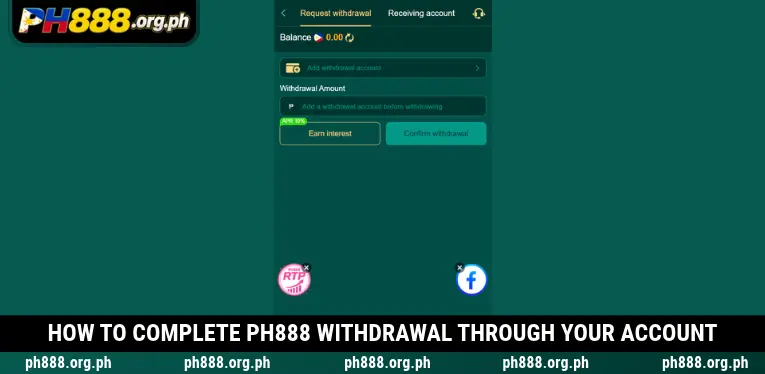
Set Up Your Six-Digit Withdrawal Password
When accessing the withdrawal feature for the first time, PH888 requires players to establish a Withdrawal Password to protect their account funds. The interface displays two fields, Set up Withdrawal Password and Confirm New Withdrawal Password, each containing six input boxes. Players must create a six-character password in the format accepted by the system, enter it again for confirmation, and select Confirm to complete the setup.
Link Your Preferred Receiving Payment Account
After creating a withdrawal password, open the Receiving Account section and select Add Withdrawal Account to register a payment destination. PH888 currently displays three options: GCASH, PayMaya, and Bank Transfer, each with a corresponding Add button. Players should select an account they legally own, provide the requested information, and carefully verify the details before saving to reduce possible payment errors.
Enter the Amount and Submit Your Withdrawal Request
Within the PH888 Withdrawal interface, return to Request Withdrawal after successfully linking a receiving account. The system displays the current balance, a Withdrawal Amount field, and a Confirm Withdrawal button for submitting the request. Players should check their available funds, enter an amount that meets the applicable requirements, and complete any additional verification steps requested by the system.
Available Withdrawal Methods Supported by PH888
The PH888 Withdrawal system provides three receiving methods displayed directly within the Receiving Account section. PH888 allows players to add electronic wallets or bank details before initiating transactions. The interface also displays the number of linked receiving accounts, making it easier to review payment destinations and manage account information.
| Withdrawal Method | Account Type | Required Action |
| GCash | Electronic wallet | Select GCASH and tap Add |
| PayMaya | Electronic wallet | Select PayMaya and tap Add |
| Bank Transfer | Bank account | Select Bank Transfer and tap Add |
Withdrawal Password Requirements and Security at PH888
The withdrawal password serves as an additional security measure that PH888 requires players to establish before using its cashout feature. Unlike the regular login password, the Withdrawal Password is associated with protecting funds during the withdrawal process. The interface also includes a warning reminding users to keep this password confidential to prevent potential financial losses.
When using PH888 Withdrawal, players should remember their selected password and avoid sharing it with other individuals. Predictable combinations such as birthdays, consecutive numbers, or publicly available personal information should be avoided. If the password is forgotten, users should contact Customer Service for assistance through the appropriate identity verification process.
Essential Requirements Before Requesting a Withdrawal
Before submitting a PH888 Withdrawal request, players should verify their available balance, receiving account information, and applicable transaction requirements. PH888 requires users to add a receiving account before entering a withdrawal amount, making payment account registration an essential part of completing the process.
- Available account balance: Players should check their Balance before entering a withdrawal amount to avoid requesting more than their available funds. A displayed account balance does not necessarily mean that the entire amount is immediately eligible for withdrawal.
- Accurate receiving account details: GCash, PayMaya, or bank account information must match the legitimate account holder’s details. Incorrect account numbers or recipient information may interrupt payment processing and create additional verification requirements.
- Valid withdrawal password: Users must complete the six-character password setup according to the interface requirements. Avoid predictable passwords and never disclose authentication details to individuals claiming to represent customer support.
- Applicable wagering requirements: Certain promotional rewards may include wagering conditions that must be satisfied before withdrawal. Players should review the terms of any bonus they have claimed to determine whether the corresponding funds are eligible for cashout.
- Current transaction regulations: Withdrawal limits and processing times should be verified directly when submitting a request. Players should not assume that all receiving methods share identical transaction limits or payment completion times.
How to Manage Receiving Accounts Within PH888
In addition to submitting cashout requests, PH888 provides a Receiving Account section where players can manage their linked payment methods. The interface displays an account counter in the format 0/10 alongside a refresh icon, allowing users to identify how many receiving accounts have been added. New payment destinations can be registered by selecting Add beside the corresponding method.
Players in the Philippines should review their receiving account information before every transaction, particularly after changing their electronic wallet phone number or bank account details. PH888 encourages accurate information and careful management of linked payment accounts to reduce the risk of incorrect transfers or disputes concerning account ownership.
Common Withdrawal Problems and Recommended Solutions
While using PH888 Withdrawal, players may experience difficulties involving password setup, receiving account information, or transaction requirements. PH888 displays essential security instructions within the withdrawal interface and provides a customer support option for users who cannot proceed with their requests.
| Common Problem | Possible Cause | Recommended Solution |
| Unable to access the withdrawal feature | Withdrawal Password has not been created | Set up and confirm a six-character password |
| Cannot enter a withdrawal amount | No receiving account has been added | Open Receiving Account and select Add |
| Password confirmation fails | The two password entries do not match | Re-enter the correct password |
| Invalid receiving account | Incorrect wallet or bank details | Review and update the account information |
| Withdrawal request remains incomplete | Additional transaction verification may be required | Contact Customer Service for assistance |
Important Security Tips for Receiving Funds at PH888
To protect their accounts when using PH888 Withdrawal, players should prioritize accurate receiving information and remain aware of potential unauthorized access. PH888 encourages users to complete transactions through the platform interface and communicate only through customer support channels displayed within the system.
- Never disclose your withdrawal password: Keep the Withdrawal Password private and avoid sharing it through Messenger, Telegram, or other messaging applications. Exposing this password may increase the risk of unauthorized transactions and potential financial losses.
- Use legally owned receiving accounts: Only link electronic wallets or bank accounts that you personally own or are authorized to manage. This helps reduce identity verification complications and disputes involving payment ownership.
- Verify details before confirmation: Check the withdrawal amount, selected receiving method, and account information displayed in the request. Reviewing these details beforehand helps minimize mistakes that could delay payment processing.
- Recognize impersonation attempts: Do not follow unexpected money transfer instructions or share OTP codes with accounts claiming to represent customer service. Verify suspicious requests through the official Message Center before taking further action.
- Retain relevant transaction information: If an issue occurs, record the request time, withdrawal amount, and available transaction status for reference. These details can help customer support representatives identify and investigate the reported situation.
Conclusion
PH888 Withdrawal supports cashout requests through GCash, PayMaya, and Bank Transfer after players establish a withdrawal password and link a receiving account. PH888 provides payment account management features that help users review balances and complete the required confirmation procedures. Players in the Philippines should protect their passwords and verify transaction details before submitting requests. Visit the Withdrawal section to check the applicable conditions and manage your cashout securely.

Si Kojima Minami ang opisyal na Brand Ambassador at Content Contributor sa PH888 Philippines. Nagbabahagi siya ng mga maaasahang tips at epektibong gabay para sa sikat na online slots, live casino tables, at pinakabagong bonus rewards. Layunin ni Kojima Minami na siguruhing ligtas, patas, at responsableng nakapaglalaro ang bawat Pinoy gamer, kasabay ng mabilis at maginhawang cash-in at cash-out gamit ang GCash at Maya.